3D Wheel Aligners Database Updates: Where to Download, How Often, and What If Your Car Is Missing?
Our wheel aligner database updates every month, free for life. Here's where to download it, how to install it, and how to get a missing car model added within 30 minutes on working days.
If you run a wheel alignment shop, you've had this problem. A new car comes in, you hook up the aligner, and the model isn't in the database. Or the data is old and the specs don't match the car in front of you.
Distributors and shop owners ask us about this all the time. So here's the straight answer — where our database comes from, how often we update it, and what to do when a model is missing.
Where the data comes from
We get vehicle data two ways.
First, we work directly with car manufacturers. When a carmaker releases a new model, we get the alignment specs through that cooperation. That's the fastest way to cover new cars — the data comes straight from the source.
Second, we buy databases from Europe. The European data fills in the gaps — older models, European brands, cars we don't get directly from the factory.
Put together, that's why our coverage is wide. It's not one source. It's factory cooperation plus purchased European data.
How often we update: about once a month
We release a database update about once a month. If a lot of new models come out at once, we push an update sooner.
Right now the biggest push is electric cars. New EVs are coming out every month — Chinese brands, European brands, new Tesla versions — and we keep adding them. If your shop works on EVs, this matters. Our EV database is very complete, and when a new electric model hits the market, we get it in fast.
Where to download — and it's free for life
Database updates are free for the life of the machine. When you buy a BATTLE-AXE 3D wheel aligner, you never pay for a database update. No subscription, no yearly fee, no per-download charge.
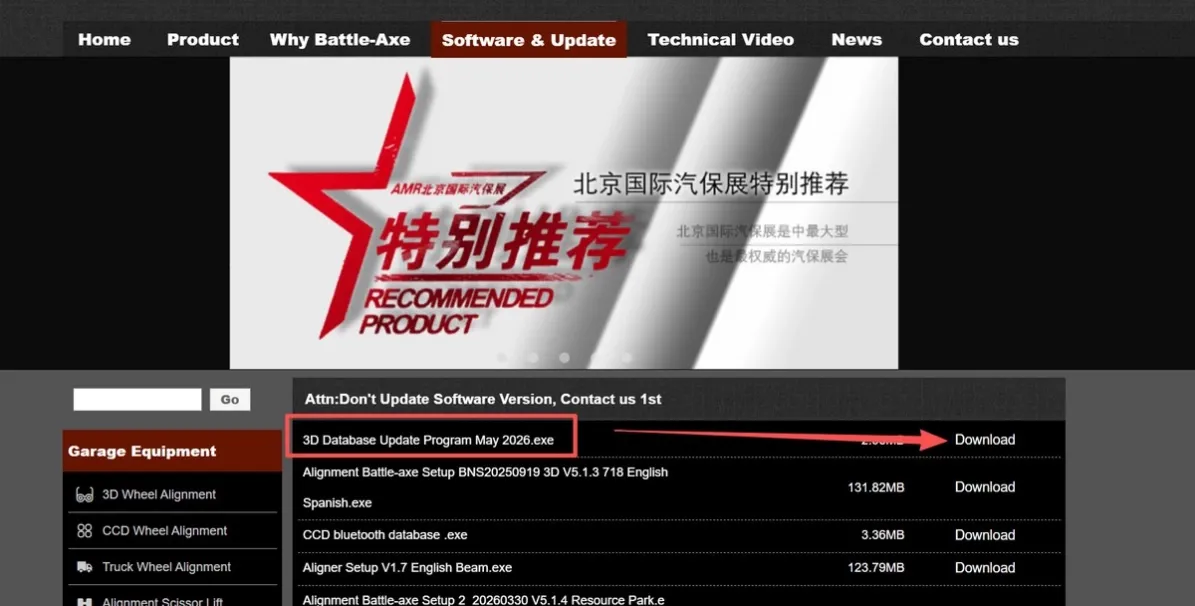
Here's how it works. Our database engineer finishes the new version, and I upload it to our download page:
http://www.hairuida.cn/en/h-msgBoard.html
On that page, look for the file called "3D Database Update Program" with the month on it — for example, "3D Database Update Program May 2026.exe". Click Download on the right and you get the file.
Don't know how to do the update after you download it? This video walks you through it step by step:
Your car model isn't in the database? We'll add it in 30 minutes
This is the part most people don't know about.
If you search the database and your car isn't there, don't worry. Just tell me the car brand and the exact model. Our engineer will add it, and on working days we upload the updated database to the website within 30 minutes — and we let you know it's ready.
You don't have to wait for the next monthly release. Tell us the car, we add it, you download it the same day.
Don't know how to search for a model quickly?
If you're new to the system, or you just want to find cars faster, this video shows you how to search the database:
It takes a minute to learn and it saves you time on every single car.
If you have a question about the database, or you need a model added, contact us:
BATTLE-AXE Wheel Alignment
Website: www.battleaxealigner.com
Email: jimmy@battle-axe.cn
WhatsApp: +86 13016308510